remb
remb

[Runtime
](../../../index.md)[Package Manager
](../../../pm/cli/install/index.md)[Bundler
](../../../bundler/index.md)[Test Runner
](../../../test/index.md)[Guides
](../../index.md)[Reference
](https://bun.com/reference)[Blog
](https://bun.com/blog)[Feedback
](../../../feedback/index.md)
Upstash is a fully managed Redis database as a service. Upstash works with the Redis® API, which means you can use Bun’s native Redis client to connect to your Upstash database.
TLS is enabled by default for all Upstash Redis databases.
1
[
](#)
Create a new project
Create a new project by running bun init:
terminal
bun init bun-upstash-redis
cd bun-upstash-redis
2
[
](#)
Create an Upstash Redis database
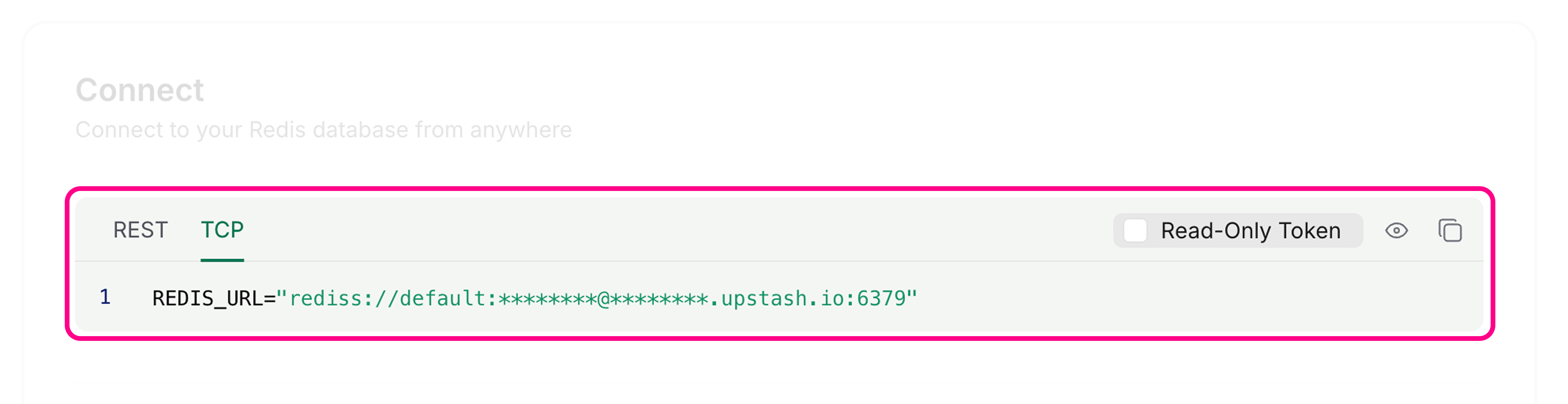
Go to the Upstash dashboard and create a new Redis database. After completing the getting started guide, you’ll see your database page with connection information.The database page displays two connection methods; HTTP and TLS. For Bun’s Redis client, you need the TLS connection details. This URL starts with rediss://.
3
[
](#)
Connect using Bun's Redis client
You can connect to Upstash by setting environment variables with Bun’s default redis client.Set the REDIS_URL environment variable in your .env file using the Redis endpoint (not the REST URL):
.env
REDIS_URL=rediss://********@********.upstash.io:6379
Bun’s Redis client reads connection information from REDIS_URL by default:
 index.ts
import { redis } from "bun";

// Reads from process.env.REDIS_URL automatically
await redis.set("counter", "0");
Alternatively, you can create a custom client using RedisClient:
index.ts
import { RedisClient } from "bun";

const redis = new RedisClient(process.env.REDIS_URL);
4
[
](#)
Use the Redis client
You can now use the Redis client to interact with your Upstash Redis database:
index.ts
import { redis } from "bun";

// Get a value
let counter = await redis.get("counter");

// Set a value if it doesn't exist
if (!counter) {
	await redis.set("counter", "0");
}

// Increment the counter
await redis.incr("counter");

// Get the updated value
counter = await redis.get("counter");
console.log(counter);
1
The Redis client automatically handles connections in the background. No need to manually connect or disconnect for basic operations.
Was this page helpful?
[
Build a frontend using Vite and Bun
Previous
](../vite/index.md)[
Common HTTP server usage
Next
](../../http/server/index.md)