 remb
rembdefault.js
Last updated April 23, 2026
The default.js file is used to render a fallback within Parallel Routes when Next.js cannot recover a slot's active state after a full-page load.
During soft navigation, Next.js keeps track of the active state (subpage) for each slot. However, for hard navigations (full-page load), Next.js cannot recover the active state. In this case, a default.js file can be rendered for subpages that don't match the current URL.
Consider the following folder structure. The @team slot has a settings page, but @analytics does not.
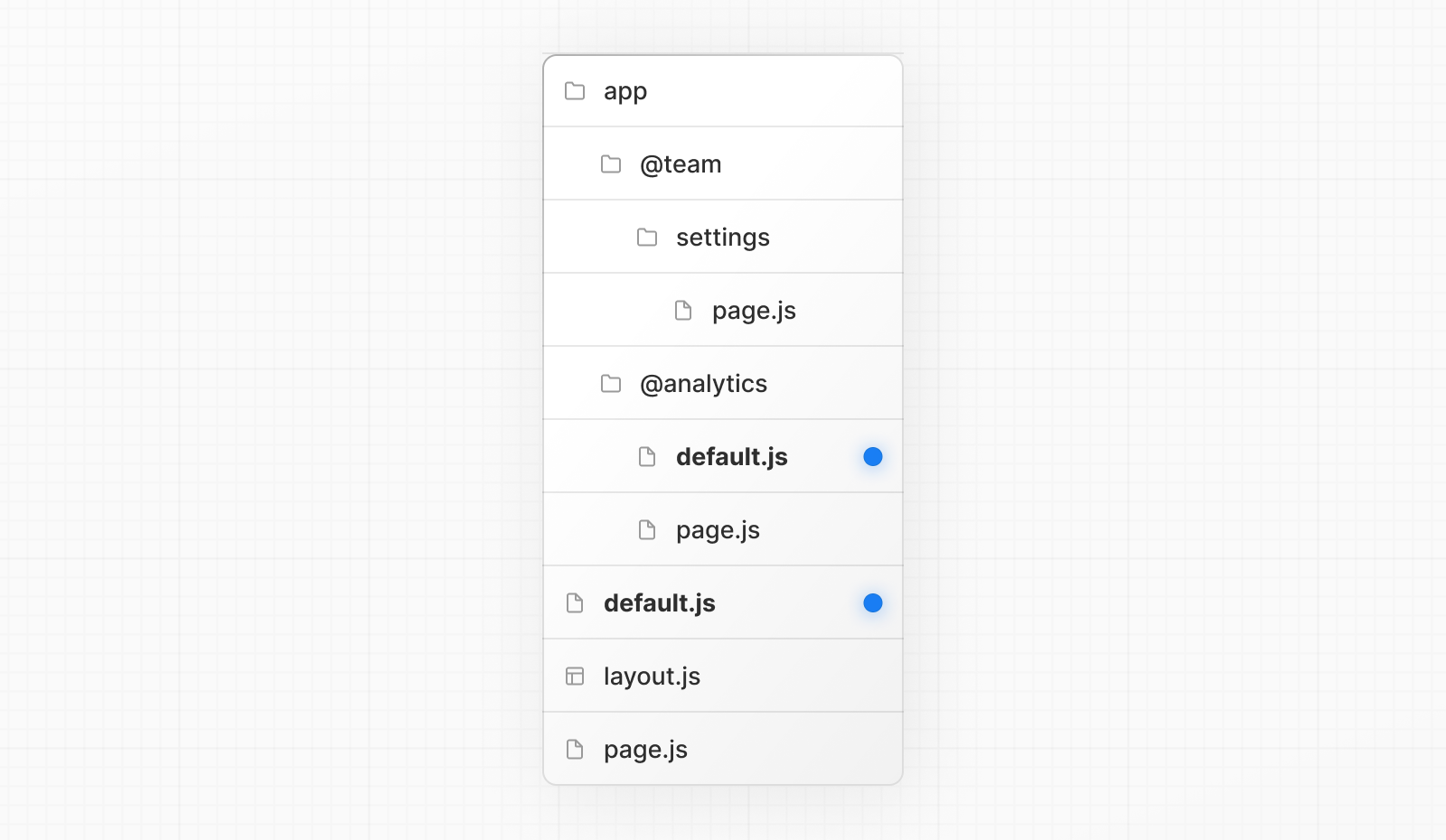
When navigating to /settings, the @team slot will render the settings page while maintaining the currently active page for the @analytics slot.
On refresh, Next.js will render a default.js for @analytics. If default.js doesn't exist, an error is returned for named slots (@team, @analytics, etc) and requires you to define a default.js in order to continue. If you want to preserve the old behavior of returning a 404 in these situations, you can create a default.js that contains:
app/@team/default.js
import { notFound } from 'next/navigation'

export default function Default() {
  notFound()
}
Additionally, since children is an implicit slot, you also need to create a default.js file to render a fallback for children when Next.js cannot recover the active state of the parent page. If you don't create a default.js for the children slot, it will return a 404 page for the route.
Reference
params (optional)
A promise that resolves to an object containing the dynamic route parameters from the root segment down to the slot's subpages. For example:
app/[artist]/@sidebar/default.js
JavaScriptTypeScript
export default async function Default({
  params,
}: {
  params: Promise<{ artist: string }>
}) {
  const { artist } = await params
}
| Example | URL | params |
|---|---|---|
app/[artist]/@sidebar/default.js | /zack | Promise<{ artist: 'zack' }> |
app/[artist]/[album]/@sidebar/default.js | /zack/next | Promise<{ artist: 'zack', album: 'next' }> |
- Since the
paramsprop is a promise. You must useasync/awaitor React'susefunction to access the values.- In version 14 and earlier,
paramswas a synchronous prop. To help with backwards compatibility, you can still access it synchronously in Next.js 15, but this behavior will be deprecated in the future.
- In version 14 and earlier,
Learn more about Parallel Routes
[
Parallel Routes
Simultaneously render one or more pages in the same view that can be navigated independently. A pattern for highly dynamic applications.
](../parallel-routes/index.md)
Was this helpful?