 remb
rembError Handling
Last updated April 23, 2026
Errors can be divided into two categories: expected errors and uncaught exceptions. This page will walk you through how you can handle these errors in your Next.js application.
Handling expected errors
Expected errors are those that can occur during the normal operation of the application, such as those from server-side form validation or failed requests. These errors should be handled explicitly and returned to the client.
Server Functions
You can use the useActionState hook to handle expected errors in Server Functions.
For these errors, avoid using try/catch blocks and throw errors. Instead, model expected errors as return values.
app/actions.ts
JavaScriptTypeScript
'use server'

export async function createPost(prevState: any, formData: FormData) {
  const title = formData.get('title')
  const content = formData.get('content')

  const res = await fetch('https://api.vercel.app/posts', {
    method: 'POST',
    body: { title, content },
  })
  const json = await res.json()

  if (!res.ok) {
    return { message: 'Failed to create post' }
  }
}
You can pass your action to the useActionState hook and use the returned state to display an error message.
app/ui/form.tsx
JavaScriptTypeScript
'use client'

import { useActionState } from 'react'
import { createPost } from '@/app/actions'

const initialState = {
  message: '',
}

export function Form() {
  const [state, formAction, pending] = useActionState(createPost, initialState)

  return (
    <form action={formAction}>
      <label htmlFor="title">Title</label>
      <input type="text" id="title" name="title" required />
      <label htmlFor="content">Content</label>
      <textarea id="content" name="content" required />
      {state?.message && <p aria-live="polite">{state.message}</p>}
      <button disabled={pending}>Create Post</button>
    </form>
  )
}
Server Components
When fetching data inside of a Server Component, you can use the response to conditionally render an error message or redirect.
app/page.tsx
JavaScriptTypeScript
export default async function Page() {
  const res = await fetch(`https://...`)
  const data = await res.json()

  if (!res.ok) {
    return 'There was an error.'
  }

  return '...'
}
Not found
You can call the notFound function within a route segment and use the not-found.js file to show a 404 UI.
app/blog/[slug]/page.tsx
JavaScriptTypeScript
import { notFound } from 'next/navigation'
import { getPostBySlug } from '@/lib/posts'

export default async function Page({
  params,
}: {
  params: Promise<{ slug: string }>
}) {
  const { slug } = await params
  const post = getPostBySlug(slug)

  if (!post) {
    notFound()
  }

  return <div>{post.title}</div>
}
app/blog/[slug]/not-found.tsx
JavaScriptTypeScript
export default function NotFound() {
  return <div>404 - Page Not Found</div>
}
Handling uncaught exceptions
Uncaught exceptions are unexpected errors that indicate bugs or issues that should not occur during the normal flow of your application. These should be handled by throwing errors, which will then be caught by error boundaries.
Nested error boundaries
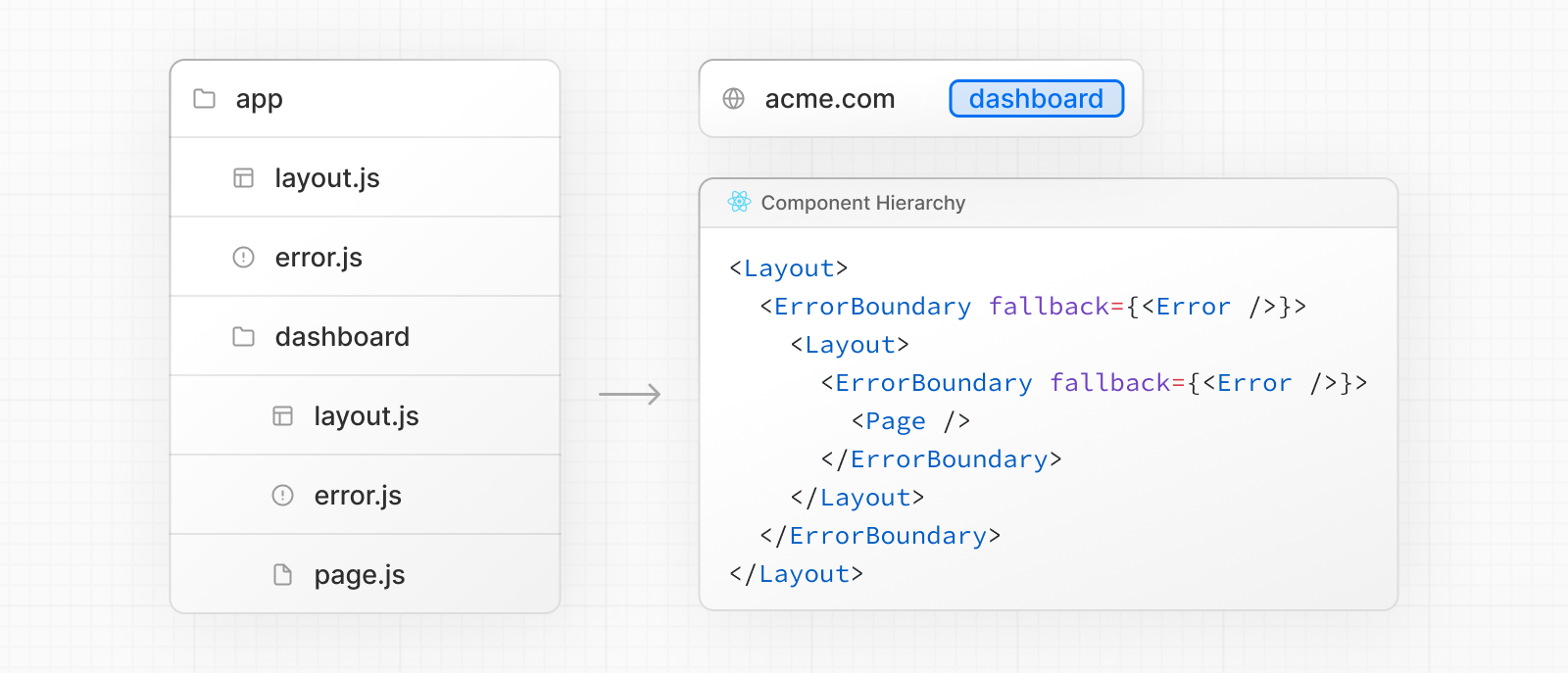
Next.js uses error boundaries to handle uncaught exceptions. Error boundaries catch errors in their child components and display a fallback UI instead of the component tree that crashed.
Create an error boundary by adding an error.js file inside a route segment and exporting a React component:
app/dashboard/error.tsx
JavaScriptTypeScript
'use client' // Error boundaries must be Client Components

import { useEffect } from 'react'

export default function ErrorPage({
  error,
  unstable_retry,
}: {
  error: Error & { digest?: string }
  unstable_retry: () => void
}) {
  useEffect(() => {
    // Log the error to an error reporting service
    console.error(error)
  }, [error])

  return (
    <div>
      <h2>Something went wrong!</h2>
      <button
        onClick={
          // Attempt to recover by re-fetching and re-rendering the segment
          () => unstable_retry()
        }
      >
        Try again
      </button>
    </div>
  )
}
Errors will bubble up to the nearest parent error boundary. This allows for granular error handling by placing error.tsx files at different levels in the route hierarchy.
For component-level error recovery, the unstable_catchError function lets you create error boundaries that can wrap any part of your component tree:
app/custom-error-boundary.tsx
JavaScriptTypeScript
'use client'

import { unstable_catchError as catchError, type ErrorInfo } from 'next/error'

function ErrorFallback(
  props: { title: string },
  { error, unstable_retry }: ErrorInfo
) {
  return (
    <div>
      <h2>{props.title}</h2>
      <p>{error.message}</p>
      <button onClick={() => unstable_retry()}>Try again</button>
    </div>
  )
}

export default catchError(ErrorFallback)
Then use the returned component as a wrapper in any layout or page:
app/some-component.tsx
JavaScriptTypeScript
import ErrorBoundary from './custom-error-boundary'

export default function Component({ children }: { children: React.ReactNode }) {
  return <ErrorBoundary title="Dashboard Error">{children}</ErrorBoundary>
}
Error boundaries don't catch errors inside event handlers. They're designed to catch errors during rendering to show a fallback UI instead of crashing the whole app.
In general, errors in event handlers or async code aren’t handled by error boundaries because they run after rendering.
To handle these cases, catch the error manually and store it using useState or useReducer, then update the UI to inform the user.
'use client'

import { useState } from 'react'

export function Button() {
  const [error, setError] = useState(null)

  const handleClick = () => {
    try {
      // do some work that might fail
      throw new Error('Exception')
    } catch (reason) {
      setError(reason)
    }
  }

  if (error) {
    /* render fallback UI */
  }

  return (
    <button type="button" onClick={handleClick}>
      Click me
    </button>
  )
}
Note that unhandled errors inside startTransition from useTransition, will bubble up to the nearest error boundary.
'use client'

import { useTransition } from 'react'

export function Button() {
  const [pending, startTransition] = useTransition()

  const handleClick = () =>
    startTransition(() => {
      throw new Error('Exception')
    })

  return (
    <button type="button" onClick={handleClick}>
      Click me
    </button>
  )
}
Global errors
While less common, you can handle errors in the root layout using the global-error.js file, located in the root app directory, even when leveraging internationalization. Global error UI must define its own <html> and <body> tags, since it is replacing the root layout or template when active.
app/global-error.tsx
JavaScriptTypeScript
'use client' // Error boundaries must be Client Components

export default function GlobalError({
  error,
  unstable_retry,
}: {
  error: Error & { digest?: string }
  unstable_retry: () => void
}) {
  return (
    // global-error must include html and body tags
    <html>
      <body>
        <h2>Something went wrong!</h2>
        <button onClick={() => unstable_retry()}>Try again</button>
      </body>
    </html>
  )
}
API Reference
Learn more about the features mentioned in this page by reading the API Reference.
[
redirect
API Reference for the redirect function.
](../../api-reference/functions/redirect/index.md)[
error.js
API reference for the error.js special file.
](../../api-reference/file-conventions/error/index.md)[
unstable_catchError
API Reference for the unstable_catchError function.
](../../api-reference/functions/catchError/index.md)[
notFound
API Reference for the notFound function.
](../../api-reference/functions/not-found/index.md)[
not-found.js
API reference for the not-found.js file.
](../../api-reference/file-conventions/not-found/index.md)
Was this helpful?