 remb
rembLayouts and Pages
Last updated April 23, 2026
Next.js uses file-system based routing, meaning you can use folders and files to define routes. This page will guide you through how to create layouts and pages, and link between them.
Creating a page
A page is UI that is rendered on a specific route. To create a page, add a page file inside the app directory and default export a React component. For example, to create an index page (/):

app/page.tsx
JavaScriptTypeScript
export default function Page() {
  return <h1>Hello Next.js!</h1>
}
Creating a layout
A layout is UI that is shared between multiple pages. On navigation, layouts preserve state, remain interactive, and do not rerender.
You can define a layout by default exporting a React component from a layout file. The component should accept a children prop which can be a page or another layout.
For example, to create a layout that accepts your index page as child, add a layout file inside the app directory:
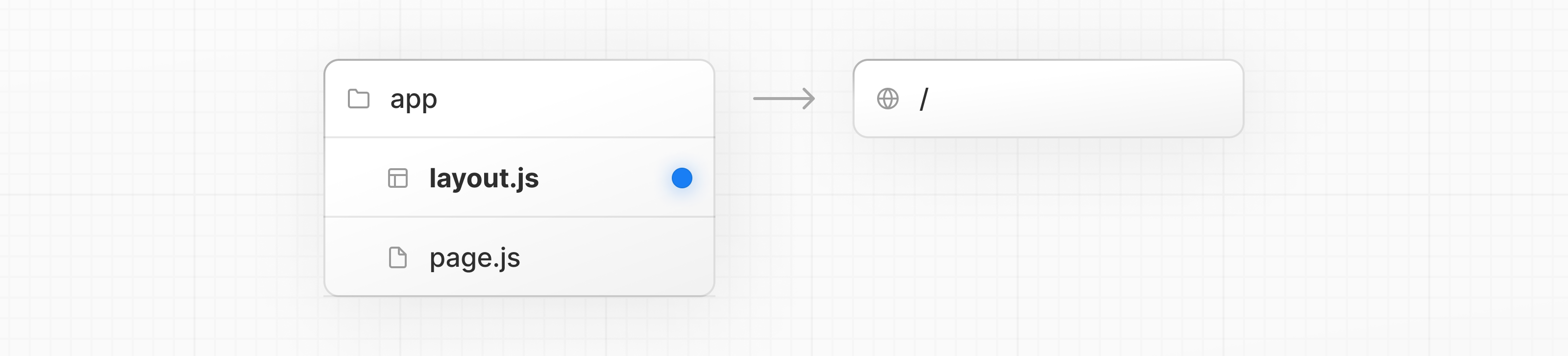
app/layout.tsx
JavaScriptTypeScript
export default function DashboardLayout({
  children,
}: {
  children: React.ReactNode
}) {
  return (
    <html lang="en">
      <body>
        {/* Layout UI */}
        {/* Place children where you want to render a page or nested layout */}
        <main>{children}</main>
      </body>
    </html>
  )
}
The layout above is called a root layout because it's defined at the root of the app directory. The root layout is required and must contain html and body tags.
Creating a nested route
A nested route is a route composed of multiple URL segments. For example, the /blog/[slug] route is composed of three segments:
/(Root Segment)blog(Segment)[slug](Leaf Segment)
In Next.js:
- Folders are used to define the route segments that map to URL segments.
- Files (like
pageandlayout) are used to create UI that is shown for a segment.
To create nested routes, you can nest folders inside each other. For example, to add a route for /blog, create a folder called blog in the app directory. Then, to make /blog publicly accessible, add a page.tsx file:
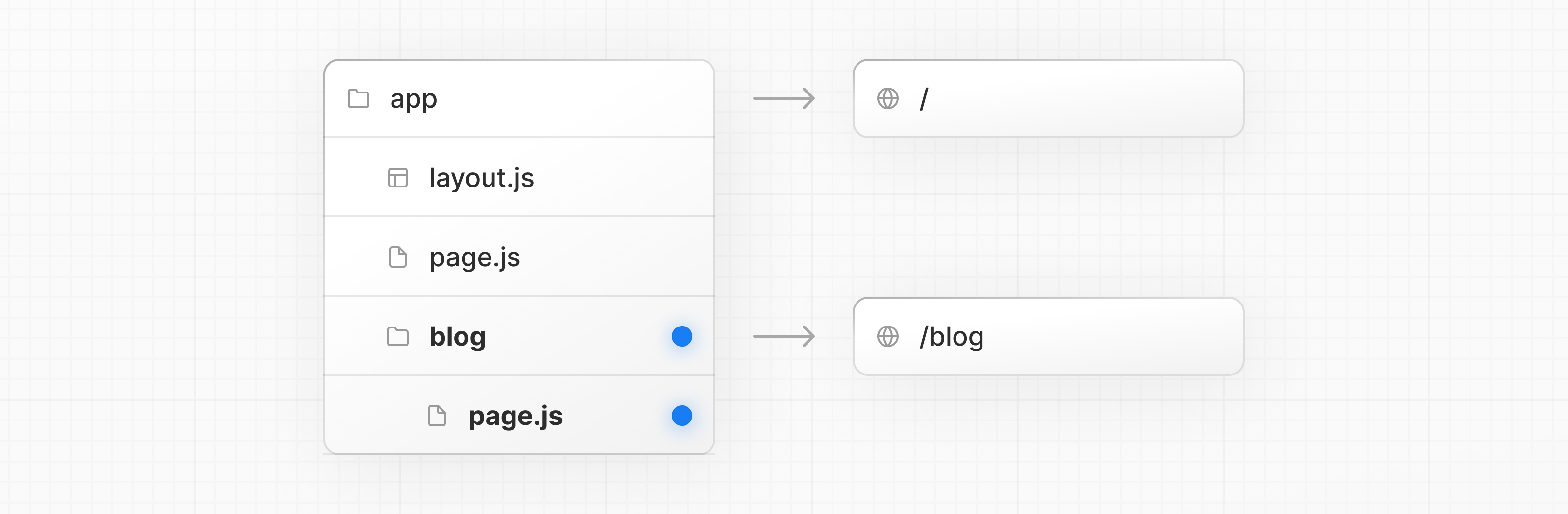
app/blog/page.tsx
JavaScriptTypeScript
// Dummy imports
import { getPosts } from '@/lib/posts'
import { Post } from '@/ui/post'

export default async function Page() {
  const posts = await getPosts()

  return (
    <ul>
      {posts.map((post) => (
        <Post key={post.id} post={post} />
      ))}
    </ul>
  )
}
You can continue nesting folders to create nested routes. For example, to create a route for a specific blog post, create a new [slug] folder inside blog and add a page file:
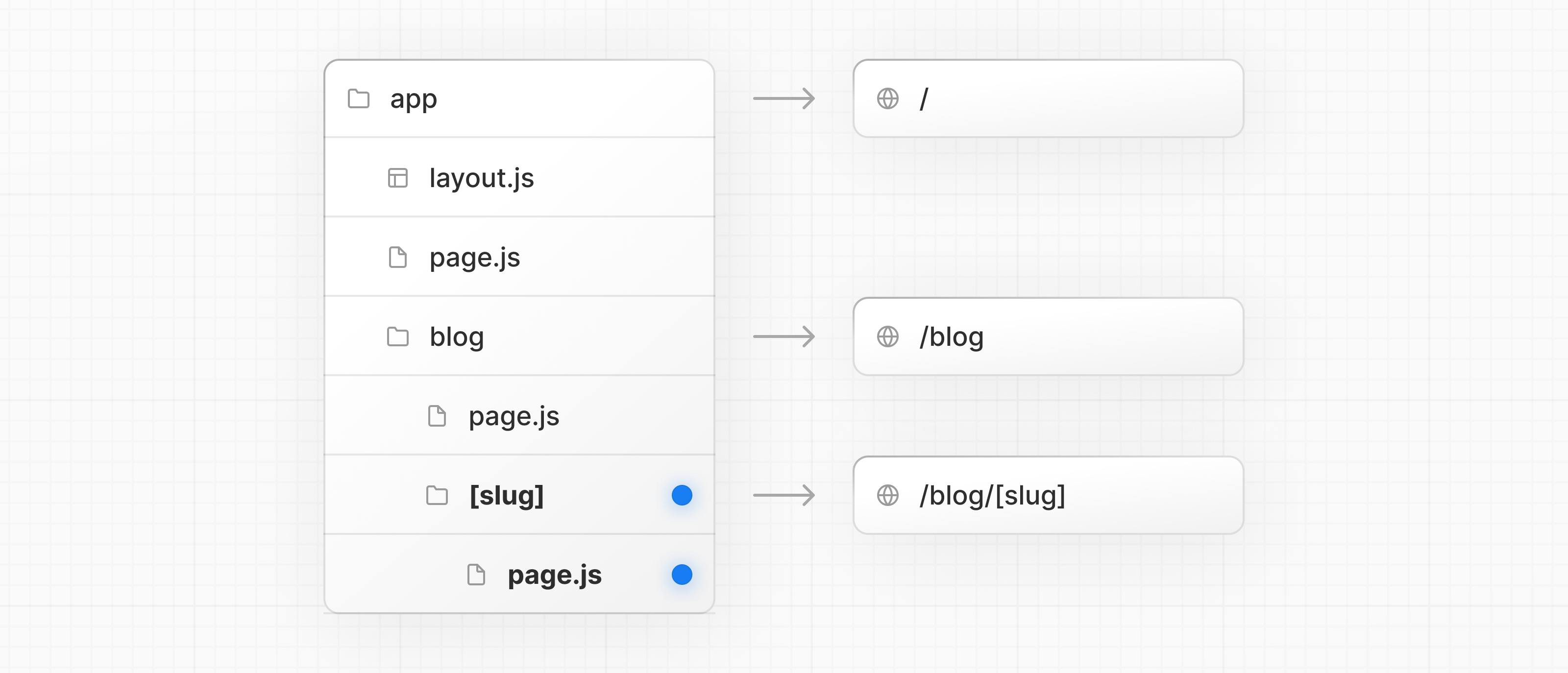
app/blog/[slug]/page.tsx
JavaScriptTypeScript
function generateStaticParams() {}

export default function Page() {
  return <h1>Hello, Blog Post Page!</h1>
}
Wrapping a folder name in square brackets (e.g. [slug]) creates a dynamic route segment which is used to generate multiple pages from data. e.g. blog posts, product pages, etc.
Nesting layouts
By default, layouts in the folder hierarchy are also nested, which means they wrap child layouts via their children prop. You can nest layouts by adding layout inside specific route segments (folders).
For example, to create a layout for the /blog route, add a new layout file inside the blog folder.
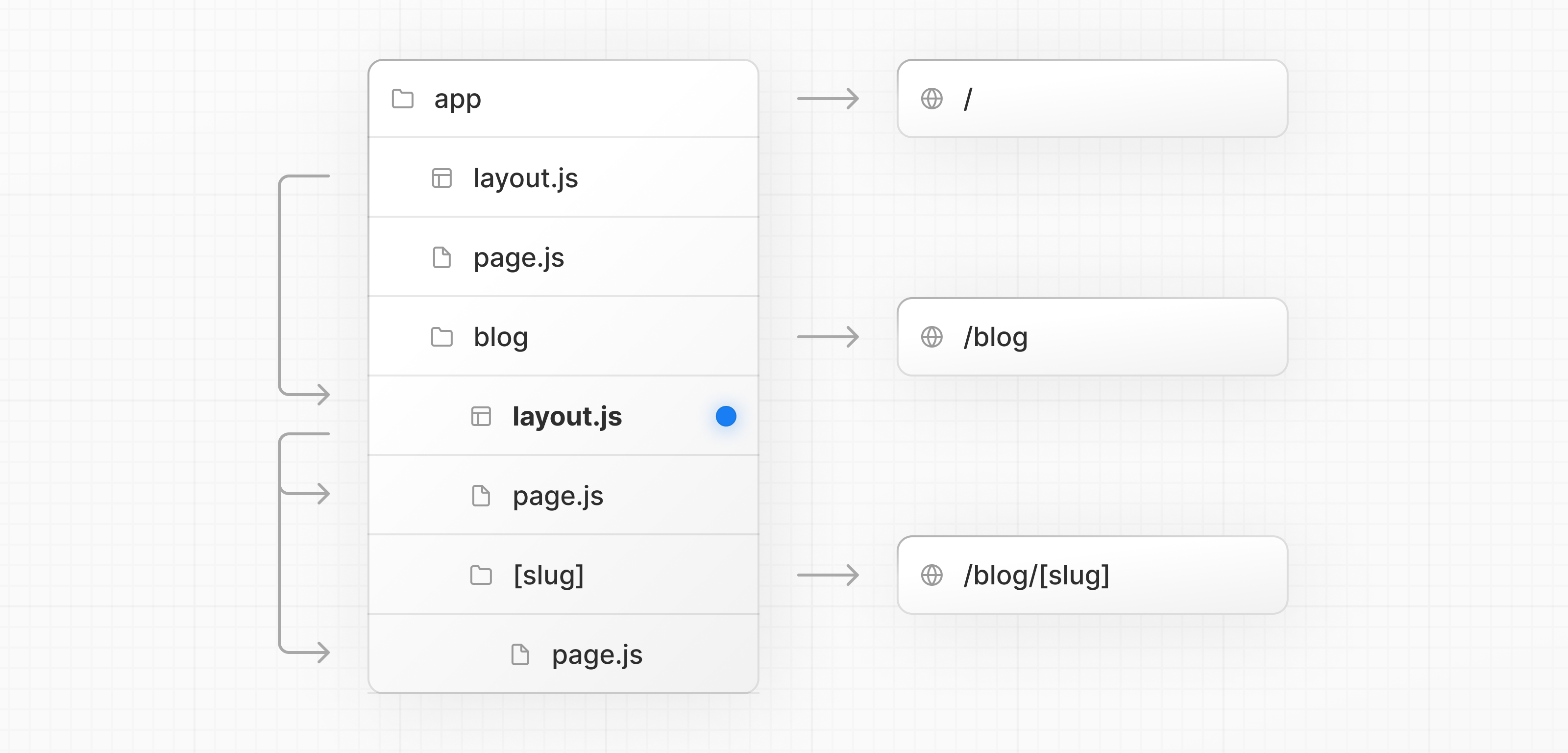
app/blog/layout.tsx
JavaScriptTypeScript
export default function BlogLayout({
  children,
}: {
  children: React.ReactNode
}) {
  return <section>{children}</section>
}
If you were to combine the two layouts above, the root layout (app/layout.js) would wrap the blog layout (app/blog/layout.js), which would wrap the blog (app/blog/page.js) and blog post page (app/blog/[slug]/page.js).
Creating a dynamic segment
Dynamic segments allow you to create routes that are generated from data. For example, instead of manually creating a route for each individual blog post, you can create a dynamic segment to generate the routes based on blog post data.
To create a dynamic segment, wrap the segment (folder) name in square brackets: [segmentName]. For example, in the app/blog/[slug]/page.tsx route, the [slug] is the dynamic segment.
app/blog/[slug]/page.tsx
JavaScriptTypeScript
export default async function BlogPostPage({
  params,
}: {
  params: Promise<{ slug: string }>
}) {
  const { slug } = await params
  const post = await getPost(slug)

  return (
    <div>
      <h1>{post.title}</h1>
      <p>{post.content}</p>
    </div>
  )
}
Learn more about Dynamic Segments and the params props.
Nested layouts within Dynamic Segments, can also access the params props.
Rendering with search params
In a Server Component page, you can access search parameters using the searchParams prop:
app/page.tsx
JavaScriptTypeScript
export default async function Page({
  searchParams,
}: {
  searchParams: Promise<{ [key: string]: string | string[] | undefined }>
}) {
  const filters = (await searchParams).filters
}
Using searchParams opts your page into dynamic rendering because it requires an incoming request to read the search parameters from.
Client Components can read search params using the useSearchParams hook.
Learn more about useSearchParams in prerendered and dynamically rendered routes.
What to use and when
- Use the
searchParamsprop when you need search parameters to load data for the page (e.g. pagination, filtering from a database). - Use
useSearchParamswhen search parameters are used only on the client (e.g. filtering a list already loaded via props). - As a small optimization, you can use
new URLSearchParams(window.location.search)in callbacks or event handlers to read search params without triggering re-renders.
Linking between pages
You can use the <Link> component to navigate between routes. <Link> is a built-in Next.js component that extends the HTML <a> tag to provide prefetching and client-side navigation.
For example, to generate a list of blog posts, import <Link> from next/link and pass a href prop to the component:
app/ui/post.tsx
JavaScriptTypeScript
import Link from 'next/link'

export default async function Post({ post }) {
  const posts = await getPosts()

  return (
    <ul>
      {posts.map((post) => (
        <li key={post.slug}>
          <Link href={`/blog/${post.slug}`}>{post.title}</Link>
        </li>
      ))}
    </ul>
  )
}
Good to know:
<Link>is the primary way to navigate between routes in Next.js. You can also use theuseRouterhook for more advanced navigation.
Route Props Helpers
Next.js exposes utility types that infer params and named slots from your route structure:
- PageProps: Props for
pagecomponents, includingparamsandsearchParams. - LayoutProps: Props for
layoutcomponents, includingchildrenand any named slots (e.g. folders like@analytics).
These are globally available helpers, generated when running either next dev, next build or next typegen.
app/blog/[slug]/page.tsx
export default async function Page(props: PageProps<'/blog/[slug]'>) {
  const { slug } = await props.params
  return <h1>Blog post: {slug}</h1>
}
app/dashboard/layout.tsx
export default function Layout(props: LayoutProps<'/dashboard'>) {
  return (
    <section>
      {props.children}
      {/* If you have app/dashboard/@analytics, it appears as a typed slot: */}
      {/* {props.analytics} */}
    </section>
  )
}
Good to know
- Static routes resolve
paramsto{}.PageProps,LayoutPropsare global helpers — no imports required.- Types are generated during
next dev,next buildornext typegen.
API Reference
Learn more about the features mentioned in this page by reading the API Reference.
[
Linking and Navigating
Learn how the built-in navigation optimizations work, including prefetching, prerendering, and client-side navigation, and how to optimize navigation for dynamic routes and slow networks.
](../linking-and-navigating/index.md)[
layout.js
API reference for the layout.js file.
](../../api-reference/file-conventions/layout/index.md)[
page.js
API reference for the page.js file.
](../../api-reference/file-conventions/page/index.md)[
Link Component
Enable fast client-side navigation with the built-in `next/link` component.
](../../api-reference/components/link/index.md)[
Dynamic Segments
Dynamic Route Segments can be used to programmatically generate route segments from dynamic data.
](../../api-reference/file-conventions/dynamic-routes/index.md)
Was this helpful?