 remb
rembDocumentation Index
Fetch the complete documentation index at: https://resend.com/docs/llms.txt
Use this file to discover all available pages before exploring further.
A wait-until step holds the Automation until a specific event is received. Unlike a delay, which resumes after a fixed time, this step resumes when something happens in your application. Common use cases:
- Payment — Wait for a payment to succeed before sending a receipt.
- Adoption — Wait for a user to complete an action to unlock a feature.
- Verification — Wait for the user to verify their email before continuing.
[
](#how-it-works)
How it works
Using the dashboard
Add a Wait for event step and configure the event to wait for.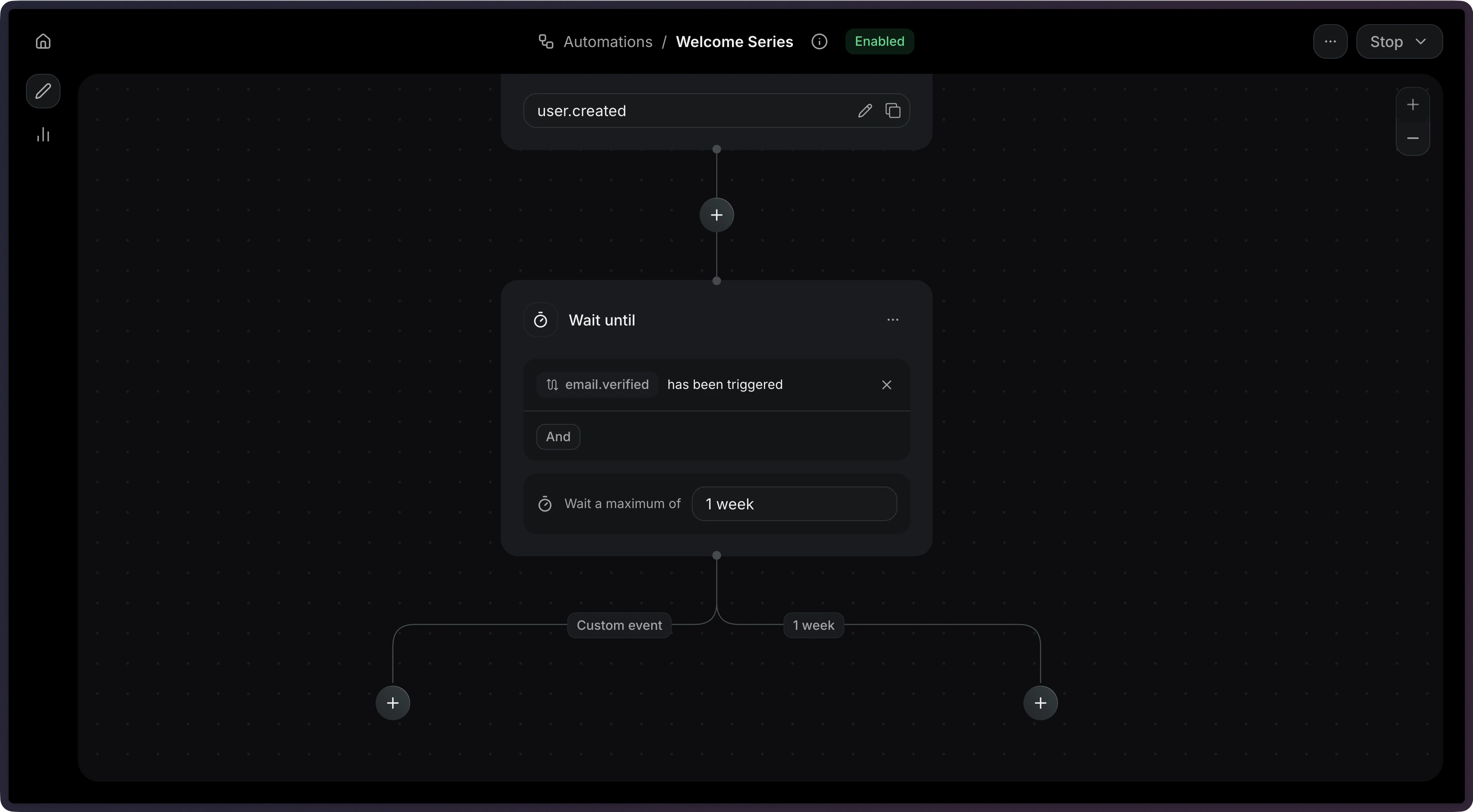
Using the API
Add a wait_for_event step to your Automation’s steps array.
[
](#timeouts)
Timeouts
When you set a timeout, the step will stop waiting after that duration. This prevents Automations from waiting indefinitely. When a wait-until step times out, it produces two possible connection types:
| Connection type | When it’s used |
|---|---|
event_received | The event arrived before the timeout |
timeout | The timeout elapsed without receiving the event |
You can create different paths depending on whether the user took action within an given time period.
{
  "key": "payment",
  "type": "wait_for_event",
  "config": {
    "event_name": "payment.completed",
    "timeout": "3 days"
  }
}
The maximum timeout is 30 days.
[
](#filter-rules)
Filter rules
Use filter_rule to match events that meet only specific criteria. This is useful when the same event name might be sent with different payloads. For example, to wait specifically for a successful payment:
{
  "key": "payment",
  "type": "wait_for_event",
  "config": {
    "event_name": "payment.completed",
    "filter_rule": {
      "field": "event.status",
      "operator": "eq",
      "value": "succeeded"
    }
  }
}
The filter rule supports the same operators as condition steps.
[
](#configuration)
Configuration
[
](#param-config-event-name)
config.event_name
string
required
The name of the event to wait for.
[
](#param-config-timeout)
config.timeout
string
The maximum time to wait before timing out (e.g. "3 days", "1 hour"). Maximum: 30 days.
[
](#param-config-filter-rule)
config.filter_rule
object
An optional rule object to filter incoming events.
Example
{
  "key": "wait_for_purchase",
  "type": "wait_for_event",
  "config": {
    "event_name": "purchase.completed",
    "timeout": "3 days"
  }
}